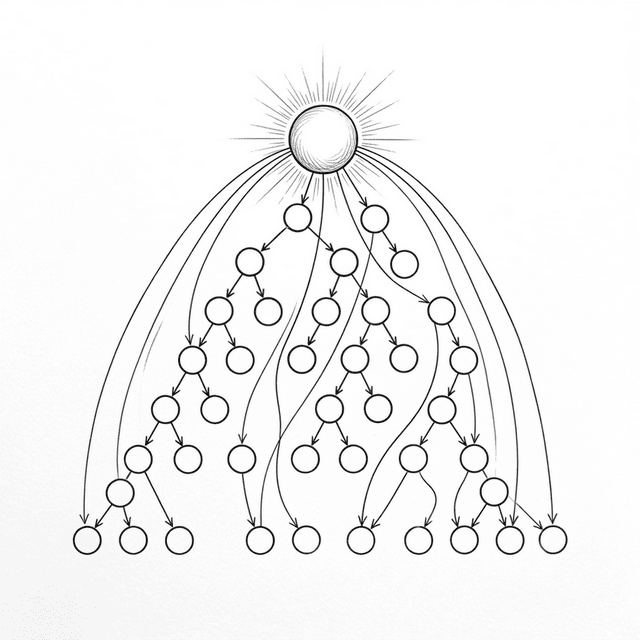
Chapter 14: State Management and the Cross-Layer Bridge
Po built a larger Todo app with the Hooks from previous chapters. useState managed local state, useEffect handled side effects, useMemo optimized expensive computations. But soon he hit a new problem that none of the four tools could solve.
14.1 The Pain of Prop Drilling
Shifu, my app structure looks roughly like this:
App
├── Header            ← needs user.name
├── Sidebar
│   └── UserProfile   ← needs user.name, user.avatar
└── Main
    └── Content
        └── TodoList
            └── TodoItem  ← needs theme.color
The user's name is in App's State, but it needs to be used in Header and the deeply nested UserProfile. The theme color is also in App, but needs to reach TodoItem five levels deep. Look at how these Props get passed:
function App() {
  const [user] = useState({ name: 'Po', avatar: '🧑' });
  const [theme] = useState({ color: '#0066cc' });

  return h('div', null, [
    h(Header,  { user: user }),
    h(Sidebar, { user: user }),
    h(Main,    { user: user, theme: theme }),
  ]);
}

function Main({ user, theme }) {
  // Main doesn't need user, but must pass it down!
  return h(Content, { user: user, theme: theme });
}

function Content({ user, theme }) {
  // Content doesn't need user either, but must pass it down!
  return h(TodoList, { user: user, theme: theme });
}
Every layer passes user and theme, but the middle layers (Main, Content) don't need this data at all! They're just "delivery workers," accepting and blindly forwarding.
This is Prop Drilling. As app depth increases, this pattern has two big problems: noise (middle components are forced to accept and pass irrelevant Props) and fragility (adding a new locale prop to TodoItem means modifying every component on the entire chain).
What are the solutions?
Two paths. One is to "extract" shared state into a global container (like Redux) that any component can subscribe to directly. The other is to let data "penetrate" the component tree like a signal, bypassing the middle layers (Context API).
Before covering these two paths, let me introduce a tool you'll soon need — useReducer.
14.2 Centralizing State Logic: useReducer
useReducer? How is that different from useState?
When state logic gets complex, useState starts getting messy:
// Managing complex state with useState: multiple setters, logic scattered everywhere
function TodoApp() {
  const [todos, setTodos] = useState([]);
  const [filter, setFilter] = useState('all');
  const [loading, setLoading] = useState(false);

  const addTodo = (text) => setTodos(prev => [...prev, { text, done: false }]);
  const removeTodo = (i) => setTodos(prev => prev.filter((_, idx) => idx !== i));
  // Toggle done (also needs to update loading): needs multiple setters...
}That's messy — every operation has to manually assemble new state.
useReducer's approach: concentrate all state change logic in a pure function (Reducer), then trigger updates by dispatching an "Action":
// Reducer: a pure function describing "how state changes when an action arrives"
function todosReducer(state, action) {
  switch (action.type) {
    case 'ADD':
      return { ...state, todos: [...state.todos, { text: action.text, done: false }] };
    case 'REMOVE':
      return { ...state, todos: state.todos.filter((_, i) => i !== action.index) };
    case 'TOGGLE':
      return {
        ...state,
        todos: state.todos.map((t, i) =>
          i === action.index ? { ...t, done: !t.done } : t
        )
      };
    default:
      return state;
  }
}

function TodoApp() {
  const [state, dispatch] = useReducer(todosReducer, { todos: [], filter: 'all' });

  return h('div', null, [
    h('button', { onclick: () => dispatch({ type: 'ADD', text: 'Buy milk' }) }, 'Add'),
    // ...
  ]);
}Interesting! All state changes have a clear "name" (action.type), logic is centralized, easy to trace and debug.
You got it. useReducer is really just a variant of useState — you're extracting "how to update" from scattered setters and putting it all in one function. Remember this pattern, because Redux — which you'll see next — does exactly this: takes the Reducer out of the component and into a global store.
14.3 Global State: createStore (Mini-Redux)
The first approach to solving Prop Drilling: extract shared state out of the component tree, into a global, predictable container.
Like a public "warehouse"?
Exactly. This is Redux's (2015) core idea — identical to useReducer, except the Store is now outside the component tree and any component can subscribe directly. Let's implement a minimal version:
function createStore(reducer, initialState) {
  let state = initialState;
  let listeners = [];

  return {
    getState() {
      return state;
    },

    dispatch(action) {
      // Reducer: pure function, (old state, action) → new state
      state = reducer(state, action);
      listeners.forEach(fn => fn());
    },

    subscribe(fn) {
      listeners.push(fn);
      return () => {
        listeners = listeners.filter(l => l !== fn);
      };
    }
  };
}
Full usage example showing the complete mini-redux workflow:
// 1. Define Reducer
function counterReducer(state, action) {
  switch (action.type) {
    case 'INCREMENT': return { ...state, count: state.count + 1 };
    case 'DECREMENT': return { ...state, count: state.count - 1 };
    default: return state;
  }
}

// 2. Create Store: initial state + Reducer
const store = createStore(counterReducer, { count: 0 });

// 3. Subscribe to state changes: fires after every dispatch
store.subscribe(() => {
  const { count } = store.getState();
  document.getElementById('display').textContent = 'Count: ' + count;
});

// 4. User action → dispatch Action → Reducer computes new state → notify subscribers
document.getElementById('inc-btn').addEventListener('click', () => {
  store.dispatch({ type: 'INCREMENT' });
});
Note the flow: user action → dispatch → reducer → new state → subscribers update UI. The entire data flow is one-way and predictable.
This looks a lot like chapter three's EventEmitter — notify subscribers when data changes!
Yes, but one key difference: state updates must go through dispatch + reducer, which is a pure function. This means state changes are predictable (given the same input, always the same output), and can be recorded and replayed (Time Travel Debugging).
14.4 The Context API in the Fiber Era
For simple global data (like theme, user info, language settings), React provides the Context API. In the old component architecture it was somewhat obscure. But in our Fiber architecture, implementing it is surprisingly easy.
Why easy?
Remember Fiber's data structure? Every Fiber node has a return pointer pointing to its parent. This means no matter how deep in the component tree you are, you have a direct highway to the root.
function createContext(defaultValue) {
  return {
    _currentValue: defaultValue, // fallback default value
  };
}

// A plain wrapper component with a special marker (type === ContextProvider)
function ContextProvider(props) {
  // It just renders children,
  // but its Fiber node carries context and value, waiting for descendants to "claim"
  return props.children;
}
When we call useContext from a deeply nested child, the intuitive thing happens — walk up the return pointer chain to ancestors, find the first node providing this Context:
function useContext(contextType) {
  let currentFiber = wipFiber;

  // Walk up the return pointer!
  while (currentFiber) {
    if (
      currentFiber.type === ContextProvider &&
      currentFiber.props.context === contextType
    ) {
      // Found it! "Steal" the value from this ancestor's props
      return currentFiber.props.value;
    }
    currentFiber = currentFiber.return;
  }

  // Reached root without finding a Provider — return createContext's default value
  return contextType._currentValue;
}Oh! This is literally the scope chain — but for component trees! An inner component needs a value; if it doesn't have one, asks the parent; parent doesn't have it, asks the grandparent... until finding the nearest ancestor that provides this Context.
Exactly. And since useContext runs during Render phase, if an ancestor's value changes and this child component is asked to repaint, it walks up again and naturally picks up the fresh value.
Real React's Context is somewhat more complex — it needs to solve a performance problem: when a Provider's value changes, if some middle components have blocked updates via React.memo, how can child components still get notified and force an update? React's source code has some sophisticated dependency collection to break through this barrier. But conceptually, walking up the vine is the essence of Context.
14.5 The Landscape and Future of State Management
With Redux and Context, do I have all the state management weapons?
These two patterns are still the backbone of the ecosystem. But for more complex modern apps, they each expose pain points: Redux's boilerplate (Action, Reducer, Store) is too verbose; Context, when values update, causes all components subscribing to that Context to re-execute, lacking fine-grained surgical update capability.
So state management's "future" is evolving in two directions: minimalism (like Zustand, which greatly simplifies Redux and uses Hook-based precise subscriptions), and atomic state (like Jotai / Recoil, breaking state into countless tiny independent "atoms" — only components truly subscribed to a changed atom update, fundamentally solving Context's performance issue).
"Surgical updates" sounds like everyone's ultimate goal?
Right on the mark! This pursuit even spawned a framework design fundamentally different from React. Let's look at that very different design — and how it makes us reconsider the essence of the "full re-execution" model.
14.6 Extended Reading: React vs Signals (SolidJS)
Po, after learning React's state management, I want you to see a completely different mental model — SolidJS's Signals.
React's core assumption: on every state change, the entire component function re-executes (you met the "full re-execution" model in chapter twelve). SolidJS does the exact opposite — the component function runs once, and when state changes, it directly updates the corresponding DOM node — no Virtual DOM, no Diff.
// React: entire function re-executes every time count changes
function Counter() {
  const [count, setCount] = useState(0);
  return <h1>Count: {count}</h1>;
}

// SolidJS: function runs once, count() is a "subscription"
function Counter() {
  const [count, setCount] = createSignal(0);
  return <h1>Count: {count()}</h1>;  // only this text node gets updated directly
}| Dimension | React (re-execution) | SolidJS (Signals) |
|---|---|---|
| Mental model | Simple — "each render is a snapshot" | Need to understand reactivity — "which values are Signals" |
| Default performance | Requires memo/useMemo for manual optimization | Optimal by default — surgical updates |
| Code consistency | High — components are plain functions | Has "traps" — destructuring props loses reactivity |
| Concurrent ability | ✅ Can interrupt and resume rendering | ❌ Synchronous updates, hard to implement time slicing |
So React's "full re-execution" model just wastes performance? In the last chapter's e-commerce product list example — toggling dark mode causes the whole page to recompute!
Yes. So in React, to avoid "full tree re-execution" performance avalanches, developers need to manually use useMemo, useCallback, and React.memo to tell the framework "this doesn't need recomputing," "this doesn't need recreating."
SolidJS doesn't need all these patch-ups at all?
Right. In SolidJS, when state updates, only related DOM nodes re-evaluate — functions don't get recreated. That's what "Default performance" in the table means — SolidJS is surgical by default; React requires manual developer optimization.
So beyond adding developer burden, what's React's model good for?
The key is that React's render process is just "call a function, generate VNode data structure" — it doesn't directly touch the DOM. This makes it pure and disposable: React can pause rendering halfway, go handle user input, then come back. That's exactly the foundation for Concurrent Mode from chapter eleven.
SolidJS's Signal changes directly modify the DOM — no intermediate "planning phase," so nothing to pause. Faster, more surgical, but no concurrent ability in return.
So React's "full re-execution" isn't just a flaw — it's what makes Concurrent Mode possible?
Exactly. This is the fundamental trade-off of the two architectures — React chose "redundant planning phase for interruptibility," SolidJS chose "precise direct updates for default performance." No perfect answer, just the best choice for different scenarios.
SolidJS "Traps"
Finally, let me show you some counterintuitive behaviors in the Signals mental model, so you can make a fair judgment.
// SolidJS trap: destructuring "kills" reactivity
function Greeting(props) {
  // ❌ After destructuring, name becomes a static value, no longer tracking changes!
  const { name } = props;
  return <h1>Hello, {name}</h1>;  // name is always the initial value

  // ✅ Must use props.name to maintain reactivity
  return <h1>Hello, {props.name}</h1>;
}

// React has no such problem! Because it re-executes every time, always gets fresh values.// SolidJS trap: eager evaluation "kills" reactivity
function App() {
const [count, setCount] = createSignal(0);
// ❌ Evaluating directly in the setup phase, only runs once!
const doubled = count() * 2; // always 0
// ✅ Must wrap in a function for "lazy evaluation"
const doubled = () => count() * 2;
return <p>Doubled: {doubled()}</p>;
}I see. React's mental model is more forgiving — because it re-executes every time, any expression you write always gets fresh values. SolidJS's mental model is more efficient — but you must always understand "where the reactive chain broke."
This is the core trade-off each framework chose. No perfect answer, only the best choice for different scenarios.
14.7 Comparison Overview
| Approach | Pros | Cons | Use Case |
|---|---|---|---|
| Prop Drilling | Simple, explicit, traceable | Redundant in deep nesting, long change chain | Flat component tree |
| useReducer | Centralizes complex state logic | Still local state, can't share across components | Complex state within a single component |
| Redux | Predictable, Time Travel Debug | Lots of boilerplate (Action, Reducer, Store) | Large apps, complex state logic |
| Context API | Lightweight, no external library | Performance (all subscribed components re-render) | Low-frequency global data |
| Atomic (Jotai/Recoil) | Surgical updates, minimal boilerplate | Newer API, smaller ecosystem | Medium-large apps, fine-grained control |
📦 Try It Yourself
Open demoSave the following code as ch14.html — a complete app fully upgraded to the Fiber environment (including Context penetration and Mini-Redux state management):
<!DOCTYPE html>
<html lang="en">
<head>
  <meta charset="UTF-8">
  <title>Chapter 14 — Context and State (Fiber Version)</title>
  <style>
    body { font-family: sans-serif; padding: 20px; max-width: 600px; margin: 0 auto; background: #f9f9f9; }
    .card { border: 1px solid #ddd; border-radius: 8px; padding: 15px; margin: 15px 0; background: white; }
    .card h3 { margin-top: 0; }
    button { padding: 6px 12px; cursor: pointer; margin: 4px; border-radius: 4px; border: 1px solid #ccc; background: #eee; }
    li { padding: 8px 0; border-bottom: 1px solid #eee; display: flex; justify-content: space-between; align-items: center; list-style: none; }
    li .task-content { display: flex; align-items: center; gap: 8px; }
    li.done span { text-decoration: line-through; color: #999; }
    li .delete-btn { background: #ff4444; color: white; border: none; padding: 4px 8px; border-radius: 4px; cursor: pointer; }
    input[type="text"] { padding: 8px; width: 60%; border-radius: 4px; border: 1px solid #ccc; }
    #stats { font-size: 14px; color: #666; margin-top: 10px; }
    #empty-msg { color: #999; font-style: italic; font-size: 14px; margin-top: 10px; }
    #log { background: #282c34; color: #abb2bf; padding: 10px; border-radius: 4px; font-family: monospace; font-size: 13px; max-height: 150px; overflow-y: auto; margin-top: 20px; }
  </style>
</head>
<body>
  <h1>State Management (Fiber & Hooks)</h1>
  <div id="app"></div>
  <div id="log"></div>

  <script>
    // ============================================
    // 1. Engine: Mini-React (Fiber + Hooks)
    // ============================================
    function h(type, props, ...children) {
      return {
        type,
        props: {
          ...props,
          children: children.flat().map(child =>
            typeof child === "object" ? child : { type: "TEXT_ELEMENT", props: { nodeValue: child, children: [] } }
          )
        }
      };
    }

    let workInProgress = null, currentRoot = null, wipRoot = null, deletions = null;
    let wipFiber = null, hookIndex = null;

    function render(element, container) {
      wipRoot = { dom: container, props: { children: [element] }, alternate: currentRoot };
      deletions = [];
      workInProgress = wipRoot;
    }

    function workLoop(deadline) {
      let shouldYield = false;
      while (workInProgress && !shouldYield) {
        workInProgress = performUnitOfWork(workInProgress);
        shouldYield = deadline.timeRemaining() < 1;
      }
      if (!workInProgress && wipRoot) commitRoot();
      requestIdleCallback(workLoop);
    }
    requestIdleCallback(workLoop);

    function performUnitOfWork(fiber) {
      const isFunctionComponent = fiber.type instanceof Function;
      if (isFunctionComponent) {
        wipFiber = fiber;
        hookIndex = 0;
        wipFiber.hooks = [];
        const children = [fiber.type(fiber.props)].flat();
        reconcileChildren(fiber, children);
      } else {
        if (!fiber.dom) fiber.dom = createDom(fiber);
        reconcileChildren(fiber, fiber.props.children);
      }
      if (fiber.child) return fiber.child;
      let nextFiber = fiber;
      while (nextFiber) {
        if (nextFiber.sibling) return nextFiber.sibling;
        nextFiber = nextFiber.return;
      }
      return null;
    }

    function createDom(fiber) {
      const dom = fiber.type === "TEXT_ELEMENT" ? document.createTextNode("") : document.createElement(fiber.type);
      updateDom(dom, {}, fiber.props);
      return dom;
    }

    function updateDom(dom, prevProps, nextProps) {
      for (const k in prevProps) {
        if (k !== 'children') {
          if (!(k in nextProps) || prevProps[k] !== nextProps[k]) {
            if (k.startsWith('on')) dom.removeEventListener(k.slice(2).toLowerCase(), prevProps[k]);
            else if (!(k in nextProps)) {
              if (k === 'className') dom.removeAttribute('class');
              else if (k === 'style') dom.style.cssText = '';
              else dom[k] = '';
            }
          }
        }
      }
      for (const k in nextProps) {
        if (k !== 'children' && prevProps[k] !== nextProps[k]) {
          if (k.startsWith('on')) dom.addEventListener(k.slice(2).toLowerCase(), nextProps[k]);
          else {
            if (k === 'className') dom.setAttribute('class', nextProps[k]);
            else if (k === 'style' && typeof nextProps[k] === 'string') dom.style.cssText = nextProps[k];
            else dom[k] = nextProps[k];
          }
        }
      }
    }

    function reconcileChildren(wipFiber, elements) {
      let index = 0, oldFiber = wipFiber.alternate && wipFiber.alternate.child, prevSibling = null;
      while (index < elements.length || oldFiber != null) {
        const element = elements[index];
        let newFiber = null;
        const sameType = oldFiber && element && element.type === oldFiber.type;

        if (sameType) newFiber = { type: oldFiber.type, props: element.props, dom: oldFiber.dom, return: wipFiber, alternate: oldFiber, effectTag: "UPDATE" };
        if (element && !sameType) newFiber = { type: element.type, props: element.props, dom: null, return: wipFiber, alternate: null, effectTag: "PLACEMENT" };
        if (oldFiber && !sameType) { oldFiber.effectTag = "DELETION"; deletions.push(oldFiber); }

        if (oldFiber) oldFiber = oldFiber.sibling;
        if (index === 0) wipFiber.child = newFiber;
        else if (element) prevSibling.sibling = newFiber;
        prevSibling = newFiber;
        index++;
      }
    }

    function commitRoot() {
      deletions.forEach(commitWork);
      commitWork(wipRoot.child);
      commitEffects(wipRoot.child);
      currentRoot = wipRoot;
      wipRoot = null;
    }

    function commitWork(fiber) {
      if (!fiber) return;
      let domParentFiber = fiber.return;
      while (!domParentFiber.dom) domParentFiber = domParentFiber.return;
      const domParent = domParentFiber.dom;

      if (fiber.effectTag === "PLACEMENT" && fiber.dom != null) domParent.appendChild(fiber.dom);
      else if (fiber.effectTag === "UPDATE" && fiber.dom != null) updateDom(fiber.dom, fiber.alternate.props, fiber.props);
      else if (fiber.effectTag === "DELETION") {
        commitDeletion(fiber, domParent);
        return;
      }

      commitWork(fiber.child);
      commitWork(fiber.sibling);
    }

    function commitDeletion(fiber, domParent) {
      if (fiber.dom) domParent.removeChild(fiber.dom);
      else commitDeletion(fiber.child, domParent);
    }

    function commitEffects(fiber) {
      if (!fiber) return;
      if (fiber.hooks) {
        fiber.hooks.forEach(hook => {
          if (hook.tag === 'effect' && hook.hasChanged && hook.callback) {
            if (hook.cleanup) hook.cleanup();
            hook.cleanup = hook.callback();
          }
        });
      }
      commitEffects(fiber.child);
      commitEffects(fiber.sibling);
    }

    function useState(initial) {
      const oldHook = wipFiber.alternate && wipFiber.alternate.hooks && wipFiber.alternate.hooks[hookIndex];
      const hook = {
        state: oldHook ? oldHook.state : initial,
        queue: oldHook ? oldHook.queue : [],
        setState: oldHook ? oldHook.setState : null
      };

      hook.queue.forEach(action => hook.state = typeof action === 'function' ? action(hook.state) : action);
      hook.queue.length = 0;

      if (!hook.setState) {
        hook.setState = action => {
          hook.queue.push(action);
          wipRoot = { dom: currentRoot.dom, props: currentRoot.props, alternate: currentRoot };
          workInProgress = wipRoot;
          deletions = [];
        };
      }
      wipFiber.hooks.push(hook);
      hookIndex++;
      return [hook.state, hook.setState];
    }

    function useEffect(callback, deps) {
      const oldHook = wipFiber.alternate && wipFiber.alternate.hooks && wipFiber.alternate.hooks[hookIndex];
      let hasChanged = true;
      if (oldHook && deps) hasChanged = deps.some((dep, i) => !Object.is(dep, oldHook.deps[i]));
      const hook = { tag: 'effect', callback, deps, hasChanged, cleanup: oldHook ? oldHook.cleanup : undefined };
      wipFiber.hooks.push(hook);
      hookIndex++;
    }

    // ============================================
    // 2. New: Context mechanism
    // ============================================
    function createContext(defaultValue) {
      return { _currentValue: defaultValue };
    }

    // ContextProvider only passes through children,
    // but its Fiber node carries context and value for descendants to find via useContext
    function ContextProvider(props) {
      return props.children;
    }

    function useContext(contextType) {
      let currentFiber = wipFiber;
      // Walk up the return pointer, find nearest Provider
      while (currentFiber) {
        if (currentFiber.type === ContextProvider && currentFiber.props.context === contextType) {
          return currentFiber.props.value;
        }
        currentFiber = currentFiber.return;
      }
      return contextType._currentValue;
    }

    // ============================================
    // 3. New: Mini-Redux
    // ============================================
    const logEl = document.getElementById('log');
    function log(msg) {
      const line = document.createElement('div');
      line.textContent = '➤ ' + msg;
      logEl.prepend(line);
    }

    function createStore(reducer, initial) {
      let state = initial;
      let listeners = [];
      return {
        getState: () => state,
        dispatch: (action) => {
          state = reducer(state, action);
          listeners.forEach(fn => fn());
        },
        subscribe: (fn) => {
          listeners.push(fn);
          return () => { listeners = listeners.filter(l => l !== fn); };
        }
      };
    }

    function todosReducer(state, action) {
      switch (action.type) {
        case 'ADD_TODO':
          log('dispatch: ADD_TODO "' + action.text + '"');
          return { ...state, todos: [...state.todos, { text: action.text, done: false }] };
        case 'REMOVE_TODO':
          log('dispatch: REMOVE_TODO index=' + action.index);
          return { ...state, todos: state.todos.filter((_, i) => i !== action.index) };
        case 'TOGGLE_TODO':
          log('dispatch: TOGGLE_TODO index=' + action.index);
          return {
            ...state,
            todos: state.todos.map((t, i) => i === action.index ? { ...t, done: !t.done } : t)
          };
        default:
          return state;
      }
    }

    const store = createStore(todosReducer, {
      todos: [
        { text: 'Learn React', done: true },
        { text: 'Build Mini-React', done: false }
      ]
    });

    // Custom Hook: connect external Redux Store to Fiber's render mechanism
    // useEffect subscribes to store on mount, unsubscribes on unmount (cleanup function)
    function useStore(store) {
      const [state, setState] = useState(store.getState());

      useEffect(() => {
        const unsubscribe = store.subscribe(() => {
          setState(store.getState());
        });
        return unsubscribe;
      }, [store]);

      return state;
    }

    // ============================================
    // 4. App
    // ============================================
    const ThemeContext = createContext('#0066cc');

    function TodoApp() {
      const state = useStore(store);
      const [inputValue, setInputValue] = useState('');

      const doneCount = state.todos.filter(t => t.done).length;

      return h('div', { className: 'card' },
        h('h3', null, 'My Todo List (Fiber & Hooks)'),
        h('div', null,
          h('input', {
            type: 'text',
            placeholder: 'Add a task',
            value: inputValue,
            oninput: e => setInputValue(e.target.value)
          }),
          h('button', {
            id: 'add-btn',
            onclick: () => {
              if (!inputValue.trim()) return;
              store.dispatch({ type: 'ADD_TODO', text: inputValue });
              setInputValue('');
            }
          }, 'Add')
        ),
        h('p', { id: 'stats' }, `Done ${doneCount} / Total ${state.todos.length}`),
        h('p', { id: 'empty-msg', style: `display: ${state.todos.length === 0 ? 'block' : 'none'}` }, 'No data'),
        h('ul', { style: 'padding-left: 0; margin-bottom: 0;' }, state.todos.map((todo, i) => h(TodoItem, { text: todo.text, done: todo.done, index: i })))
      );
    }

    function TodoItem({ text, done, index }) {
      // useContext: walks up Fiber.return chain to find ThemeContext's Provider — no Props needed!
      const themeColor = useContext(ThemeContext);

      return h('li', done ? { className: 'done' } : null,
        h('div', { className: 'task-content' },
          h('input', Object.assign({ type: 'checkbox', onchange: () => store.dispatch({ type: 'TOGGLE_TODO', index }) }, done ? { checked: true } : {})),
          h('span', { style: `color: ${done ? '#999' : themeColor}; font-weight: bold;` }, text)
        ),
        h('button', { className: 'delete-btn', onclick: () => store.dispatch({ type: 'REMOVE_TODO', index }) }, '×')
      );
    }

    function App() {
      const [isBlue, setIsBlue] = useState(true);
      const currentColor = isBlue ? '#0066cc' : '#cc6600';

      return h('div', null,
        // ContextProvider wraps the subtree; value changes are picked up by useContext on next render
        h(ContextProvider, { context: ThemeContext, value: currentColor },
          h('div', { className: 'card' },
            h('h3', null, 'Context API Demo'),
            h('p', null, 'The todo list text color below is passed directly across layers via Fiber.return:'),
            h('div', { style: `padding: 10px; border-radius: 4px; color: white; background: ${currentColor}` },
              `Current global color: ${currentColor}`
            ),
            h('button', { onclick: () => setIsBlue(!isBlue), style: 'margin-top: 10px' }, 'Toggle Theme Color')
          ),
          h(TodoApp, null)
        )
      );
    }

    render(h(App, null), document.getElementById('app'));
    log('App started and running in Fiber architecture');
  </script>
</body>
</html>
Interactive Demo
Open demo
This page runs the original HTML demo for the chapter.
Open demo