Chapter 3: The Dawn of Data Binding
3.1 Seeking Balance
Po sat at his desk, turning over the "string concatenation" code from the last chapter, brow furrowed.
Shifu, I'm stuck in a dilemma. Raw DOM operations (chapter one) have good performance but are hard to maintain. String templates (chapter two) produce clean code but re-render the whole page every time, which is terrible for UX. Is there no middle road? Something you can write happily but that only updates the changed part?
What you're longing for is precision. Imagine when this cup of tea goes cold — you want me to heat just this cup, not warm up all the air in the room.
Exactly! If the count in the data changes, I only want to update the <span> showing the number. Don't touch anything else.
To do that, your data must stop being a silent, inert thing. It must learn to shout.
Shout?
When data changes, it needs to announce: "I changed! Whoever cares about me, come and update!" This is the Observer Pattern. Built on this, the early MVC frameworks were born.
3.2 Data That Talks
What we need now is a new kind of data model — one that can automatically notify everyone who cares when data changes. In other words, data that "talks."
Automatic notification? You mean I no longer need to manually call update functions — the data will "shout" on its own?
Exactly. This is the core of the Observer Pattern — the publisher sends a notification when state changes, and subscribers execute their updates upon receiving it. How would you implement this "shouting" mechanism?
I think I need two things: a way to "register a listener" so others can say "I care about your changes," and a way to "trigger notifications" to tell everyone who cares when data changes. Let me write a base class.
class EventEmitter {
  constructor() {
    this.listeners = {};
  }

  on(event, callback) {
    if (!this.listeners[event]) {
      this.listeners[event] = [];
    }
    this.listeners[event].push(callback);
  }

  off(event, callback) {
    if (!this.listeners[event]) return;
    this.listeners[event] = this.listeners[event].filter(f => f !== callback);
  }

  emit(event, payload) {
    if (this.listeners[event]) {
      this.listeners[event].forEach(cb => cb(payload));
    }
  }
}

class Model extends EventEmitter {
  constructor(data) {
    super();
    this.data = data;
  }

  set(key, value) {
    if (this.data[key] !== value) {
      this.data[key] = value;
      // Data changed — shout it out!
      this.emit('change', { key, value });
      this.emit(`change:${key}`, value);
    }
  }

  get(key) {
    return this.data[key];
  }
}I get it. Model becomes a data container that can "speak," and anyone who subscribes to it will be notified when data changes.
3.3 Rewriting the Todo List with MVC
Good. Now use this Model to rewrite our Todo List. Let's feel what "surgical updates" are like.
Got it. I'll put the Todo data in the Model, and when data changes, precisely update the corresponding DOM nodes.
// === Model ===
const todoModel = new Model({
  todos: [
    { id: 1, text: 'Learn JavaScript', done: true },
    { id: 2, text: 'Learn Templates', done: false }
  ],
  inputValue: '',
});

// === View ===
const listEl = document.getElementById('todo-list');
const inputEl = document.getElementById('todo-input');
const statsEl = document.getElementById('stats');

// === Binding: View → Model ===
inputEl.addEventListener('input', (e) => {
  todoModel.set('inputValue', e.target.value);
});

document.getElementById('add-btn').addEventListener('click', () => {
  const value = todoModel.get('inputValue');
  if (!value) return;
  const todos = todoModel.get('todos').slice();
  todos.push({ id: Date.now(), text: value, done: false });
  todoModel.set('todos', todos);
  todoModel.set('inputValue', '');
});

// === Binding: Model → View ===
// When the list changes, fully update the list area
todoModel.on('change:todos', () => renderFullList());

// When input value changes, [precisely update] the input box
todoModel.on('change:inputValue', (v) => {
  inputEl.value = v;
});

// We omit the renderFullList function that creates DOM details and focus on the binding relationship.
renderFullList();Great! I can type in the input box without losing focus! Because when I update the list, I never touched the input element. Every time data changes, only the related DOM gets updated.
Notice that renderList internally still uses listEl.innerHTML = '' to rebuild the list — that part is still "destroy and rebuild." The key is: the input box wasn't recreated. We only rebuilt the changed part (the list), leaving the unchanged part (the input) alone. That's what "surgical updates" means — not perfect, but much better than chapter two's full rebuild.
This is the magic of data binding. Backbone.js, Knockout.js, and even early AngularJS are outstanding representatives of this school. By making data "proactively notify," we achieved surgical DOM updates.
And the stats don't need to be maintained separately anymore. As long as change:todos triggers, the stats update automatically. Much more elegant than calling updateStats() everywhere in chapter one.
3.4 The Backlash of Complexity
Enjoy this moment of precision, Po. Because you'll soon fall into a chaotic mess.
Why? This looks perfect.
Let me show you. Imagine you want to add a few new features to this Todo List: let users switch between "All/Done/Active" filter views, add a done count stat, and provide a "Clear done" button at the bottom.
Look at what the code turns into:
// Model A: todo list
const todoModel = new Model({ todos: [...], filter: 'all' });

// Model B: stats (depends on Model A)
const statsModel = new Model({ total: 0, done: 0 });

// When View A updates → sync Model B
todoModel.on('change:todos', (todos) => {
  statsModel.set('total', todos.length);
  statsModel.set('done', todos.filter(t => t.done).length);
});

// Model B changes → update View B (stats panel)
statsModel.on('change:total', (v) => updateStatsView());
statsModel.on('change:done', (v) => updateStatsView());

// filter changes → also update View A (re-filter list)
todoModel.on('change:filter', () => {
  renderFilteredList();
});

// User clicks View B "Clear done" → remove done items from Model A
clearDoneBtn.addEventListener('click', () => {
  const remaining = todoModel.get('todos').filter(t => !t.done);
  todoModel.set('todos', remaining);
  // this triggers change:todos → updates statsModel → updates View B ...
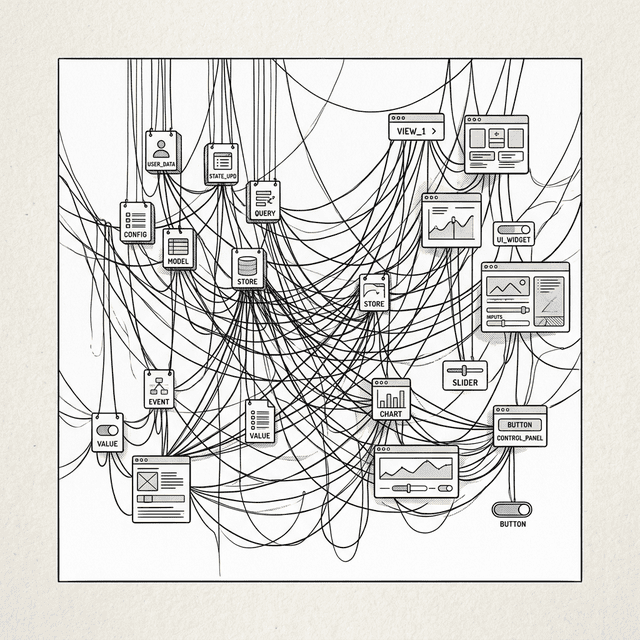
});Wait... I count Model A notifying Model B, Model B updating View B, View B's action changing Model A, Model A notifying Model B again...
This is the "Ping Pong Effect". When two-way binding and event flows get tangled, no one can say how many chain reactions one data change will trigger. And —
— when debugging, I just see some View suddenly change, but I don't know which event chain fired first.
There's also a more subtle killer — Zombie Views. If you remove the list view from the DOM when switching pages, but forget to unsubscribe it from todoModel (todoModel.off(...)), what happens?
When todoModel changes, it will still try to execute the callback, updating a DOM element that no longer exists?
Yes. This causes memory leaks and errors. You have to act like a bomb disposal expert, carefully unbinding every event when destroying a component. Miss one and your app gets slower and slower over time, full of ghost-like bugs.
3.5 A Historical Note: Backbone.js
Backbone.js was one of the first frameworks to bring MVC structure to frontend applications.
// Backbone.js style (2010)
const TodoModel = Backbone.Model.extend({
  defaults: { title: '', done: false }
});

const TodoView = Backbone.View.extend({
  tagName: 'li',

  events: {
    'click .toggle': 'toggleDone'
  },

  initialize: function() {
    // Manual binding: Model change → re-render View
    this.listenTo(this.model, 'change', this.render);
  },

  toggleDone: function() {
    this.model.set('done', !this.model.get('done'));
  },

  render: function() {
    this.$el.html('<input class="toggle" type="checkbox">' + this.model.get('title'));
    return this;
  }
});Looks very structured! Model, View, event binding are all clearly separated.
Yes, but notice that this.listenTo and the manual this.render. You have to manually build a pipeline for every Model-View relationship. Miss one and it's a bug.
3.6 Reaching the Crossroads
We've gone through three stages:
- Raw DOM: Moving bricks manually — tedious and messy.
- String templates: Tear down and rebuild — clean but slow.
- MVC: Fine surgery — but because state and events are intertwined, it became a maintenance nightmare.
Shifu, this is so discouraging. Either verbose (raw), or brutal (templates), or chaotic (MVC).
Is there really a way that's simple to write like templates (declarative), updates fast like data binding (high performance), and doesn't require me to manually manage all those event listeners?
That's a greedy wish. But history always has clever people who try to satisfy greed by breaking the rules. In the next chapter you'll see a new approach.
📦 Try It Yourself
Open demoSave the following code as ch03.html to experience how Observer-pattern data binding achieves surgical DOM updates and solves the focus-loss problem:
<!DOCTYPE html>
<html lang="en">
<head>
  <meta charset="UTF-8">
  <title>Chapter 3 — Data Binding Todo List</title>
  <style>
    body { font-family: sans-serif; padding: 20px; max-width: 600px; margin: 0 auto; background: #f9f9f9; }
    .card { border: 1px solid #ddd; border-radius: 8px; padding: 15px; margin: 15px 0; background: white; }
    .card h3 { margin-top: 0; }
    button { padding: 6px 12px; cursor: pointer; margin: 4px; border-radius: 4px; border: 1px solid #ccc; background: #eee; }
    button.active { background: #007bff; color: white; border-color: #007bff; }
    li { padding: 8px 0; border-bottom: 1px solid #eee; display: flex; justify-content: space-between; align-items: center; list-style: none; }
    li .task-content { display: flex; align-items: center; gap: 8px; }
    li.done span { text-decoration: line-through; color: #999; }
    li .delete-btn { background: #ff4444; color: white; border: none; padding: 4px 8px; border-radius: 4px; cursor: pointer; }
    input[type="text"] { padding: 8px; width: 60%; border-radius: 4px; border: 1px solid #ccc; }
    #stats { font-size: 14px; color: #666; margin-top: 10px; }
    #empty-msg { color: #999; font-style: italic; font-size: 14px; margin-top: 10px; }
    #log { background: #f5f5f5; padding: 10px; border-radius: 4px; font-family: monospace; font-size: 12px; max-height: 150px; overflow-y: auto; }
    .filters { margin: 10px 0; }
  </style>
</head>
<body>
  <div class="card">
    <h3>My Todo List</h3>
    <p style="font-size: 12px; color: #666;">This demo shows <strong>Observer Pattern</strong> data binding.<br>
     Input focus will no longer be lost, and there's a simple Filter to demonstrate state sync.</p>

    <div>
      <input type="text" id="todo-input" placeholder="Add a task">
      <button id="add-btn">Add</button>
    </div>

    <div class="filters" id="filters">
      <button data-filter="all" class="filter-btn active">All</button>
      <button data-filter="active" class="filter-btn">Active</button>
      <button data-filter="completed" class="filter-btn">Completed</button>
    </div>

    <p id="stats">Total 0 items</p>
    <p id="empty-msg">No data</p>
    <ul id="todo-list" style="padding-left: 0; margin-bottom: 0;"></ul>
  </div>

  <div class="card">
    <h3>📋 Event Log</h3>
    <div id="log"></div>
  </div>

  <script>
    // --- 1. EventEmitter (Observer Pattern core) ---
    class EventEmitter {
      constructor() { this.listeners = {}; }
      on(event, cb) {
        if (!this.listeners[event]) this.listeners[event] = [];
        this.listeners[event].push(cb);
      }
      off(event, cb) {
        if (!this.listeners[event]) return;
        this.listeners[event] = this.listeners[event].filter(f => f !== cb);
      }
      emit(event, payload) {
        if (this.listeners[event]) this.listeners[event].forEach(cb => cb(payload));
      }
    }

    // --- 2. Model (data that "shouts") ---
    class Model extends EventEmitter {
      constructor(data) { super(); this.data = data; }
      set(key, value) {
        if (this.data[key] !== value) {
          const oldValue = this.data[key];
          this.data[key] = value;
          this.emit('change', { key, value, oldValue });
          this.emit('change:' + key, value);
        }
      }
      get(key) { return this.data[key]; }
    }

    // --- 3. App logic ---
    const todoModel = new Model({
      todos: [
        { id: 1, text: 'Learn JavaScript', done: true },
        { id: 2, text: 'Learn Templates', done: false }
      ],
      inputValue: '',
      filter: 'all'
    });

    const listEl = document.getElementById('todo-list');
    const inputEl = document.getElementById('todo-input');
    const statsEl = document.getElementById('stats');
    const emptyEl = document.getElementById('empty-msg');
    const logEl = document.getElementById('log');

    function log(msg) {
      const line = document.createElement('div');
      line.textContent = '[' + new Date().toLocaleTimeString() + '] ' + msg;
      logEl.prepend(line);
    }

    function renderList() {
      listEl.innerHTML = '';
      const allTodos = todoModel.get('todos');
      const filter = todoModel.get('filter');

      const todos = allTodos.filter(t => {
        if (filter === 'active') return !t.done;
        if (filter === 'completed') return t.done;
        return true;
      });

      todos.forEach((todo) => {
        const li = document.createElement('li');
        if (todo.done) li.classList.add('done');

        const contentDiv = document.createElement('div');
        contentDiv.className = 'task-content';

        const checkbox = document.createElement('input');
        checkbox.type = 'checkbox';
        checkbox.checked = todo.done;
        checkbox.addEventListener('change', () => {
          const updated = todoModel.get('todos').map(t =>
            t.id === todo.id ? { ...t, done: checkbox.checked } : t
          );
          todoModel.set('todos', updated);
        });

        const span = document.createElement('span');
        span.textContent = todo.text;

        contentDiv.appendChild(checkbox);
        contentDiv.appendChild(span);
        li.appendChild(contentDiv);

        const deleteBtn = document.createElement('button');
        deleteBtn.className = 'delete-btn';
        deleteBtn.textContent = '×';
        deleteBtn.addEventListener('click', () => {
          const updated = todoModel.get('todos').filter(t => t.id !== todo.id);
          todoModel.set('todos', updated);
        });
        li.appendChild(deleteBtn);

        listEl.appendChild(li);
      });
      const doneCount = allTodos.filter(t => t.done).length;
      statsEl.textContent = `Done ${doneCount} / Total ${allTodos.length}`;
      emptyEl.style.display = todos.length === 0 ? 'block' : 'none';

      // Update filter button active state
      document.querySelectorAll('#filters button').forEach(btn => {
        if (btn.dataset.filter === filter) {
          btn.classList.add('active');
        } else {
          btn.classList.remove('active');
        }
      });
    }

    // Binding: View → Model
    inputEl.addEventListener('input', (e) => {
      todoModel.set('inputValue', e.target.value);
    });

    document.getElementById('add-btn').addEventListener('click', () => {
      const value = todoModel.get('inputValue');
      if (!value) return;
      const todos = todoModel.get('todos').slice();
      todos.push({ id: Date.now(), text: value, done: false });
      todoModel.set('todos', todos);
      todoModel.set('inputValue', '');
    });

    document.querySelectorAll('.filter-btn').forEach(btn => {
      btn.addEventListener('click', (e) => {
        todoModel.set('filter', e.target.dataset.filter);
      });
    });

    // Binding: Model → View (surgical updates — the input is never recreated!)
    todoModel.on('change:todos', (todos) => {
      renderList();
      log('Model.todos changed → list re-rendered (' + todos.length + ' items)');
    });

    todoModel.on('change:filter', (f) => {
      renderList();
      log('Model.filter changed to ' + f + ' → list re-rendered');
    });

    todoModel.on('change:inputValue', (v) => {
      inputEl.value = v; // only update input value, don't recreate the element
      log('Model.inputValue → "' + v + '"');
    });

    // Initialize
    renderList();
    log('App initialized. Input focus will NOT be lost!');
  </script>
</body>
</html>
Interactive Demo
Open demo
This page runs the original HTML demo for the chapter.
Open demo