Chapter 7: Class Components & Lifecycle
7.1 Giving Components Memory
Po tried to build a timer using the components from the previous lesson, but quickly ran into trouble.
Shifu, I want to make a timer component that increments a number every second. But I found that our current components have no "memory". Props are passed in from the outside, and the component itself has no way to save and modify its own data.
Before frameworks existed, developers were already using various ways to give "components" memory. How would you do it?
If it's an ordinary class, the most natural way would be to store it in the class's instance properties, right? For example, I could add this._count = 0 to the instance, and every time it needs to increment, I just do this._count++.
Correct. This is the standard practice in object-oriented programming. But it introduces a new problem: after you execute this._count++, the number in the console changes, but does the number on the screen change?
No. I only modified the data; I haven't written any code to update the DOM. Do I still have to manually call something like document.getElementById('counter').innerText = this._count?
This is exactly the pain point of early front-end development. When data changes, you must manually find the corresponding DOM node and modify it. Once the state becomes plentiful, it is easy to forget to update a DOM node somewhere, or update the wrong one.
That's too agonizing. We need the framework to take over. When the component's data changes, the UI should automatically re-render.
Yes. For the framework to "sense" data changes, we can no longer simply modify this._count directly. We need to introduce State. What do you think is the difference between State and Props?
Props are like the component's external parameters, passed in and controlled by the parent component, and the current component shouldn't modify them directly. State, on the other hand, should be the component's internal memory, the data owned by the component itself.
7.2 Implementing setState
Precise. When the internal State of a component changes, the UI should automatically update. Suppose we provide an API called setState, how do you think it should be used to update the state?
I think it should be like this: I call this.setState({ count: 1 }), and the component internally merges the old and new states, then automatically triggers a re-render.
Exactly. Let's implement this API. Think about it: if you were to write the internal logic of setState, what steps would be required?
First, it definitely needs to merge the incoming new state with the old state, and save it to this.state. Then... because the interface needs to be updated, it has to call this.render() to generate a new VNode tree?
Continue. What happens after the new VNode tree is generated?
Then I need to get the old VNode tree, and call the patch(oldVNode, newVNode) we wrote in the previous chapter to compare and update the actual DOM.
Very clear logic. Write it out in code.
Okay, I'll add this logic to the Component base class:
class Component {
  constructor(props) {
    this.props = props || {};
    this.state = {};
  }

  setState(newState) {
    // 1. Merge state (shallow merge)
    this.state = Object.assign({}, this.state, newState);
    // 2. Trigger update
    this._update();
  }

  _update() {
    const oldVNode = this._vnode;
    const newVNode = this.render();
    patch(oldVNode, newVNode);
    // 3. Remember the new VNode
    this._vnode = newVNode;
  }

  render() {
    throw new Error('Component must implement render()');
  }
}This connects all our previous achievements: setState → render() → patch() → update the changed DOM.
💡 Simplification Note: Synchronous vs. Batching
Our simplified
setStateis synchronous—every call immediately triggers a re-render. However, real React'ssetStateuses Batching: if you callsetStatemultiple times consecutively within the same event handler, React will only trigger one re-render.// Without batching, these two lines trigger two renders: this.setState({ a: 1 }); // Render #1 this.setState({ b: 2 }); // Render #2 // With batching, React merges them into { a: 1, b: 2 } and renders only onceThis is one of React's core performance optimizations.
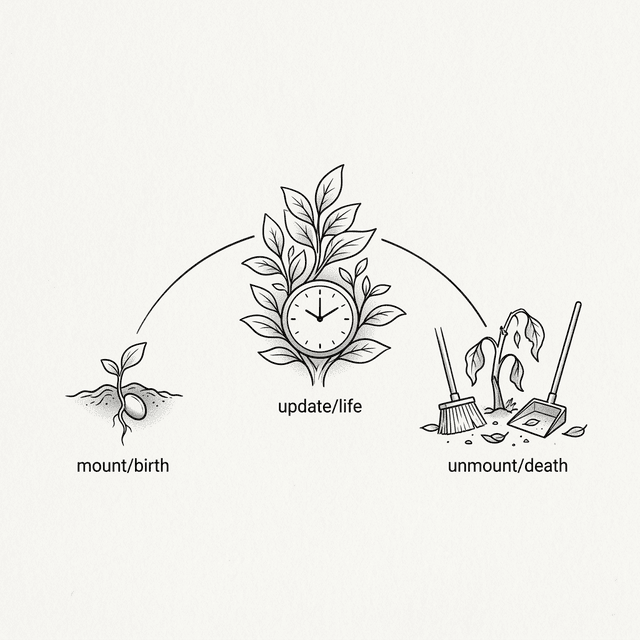
7.3 Lifecycle
With setState, I can make the timer update the number. But I've hit a practical problem—I need to use setInterval to call setState every second. However, where should this setInterval be written?
Do you think it can be written inside render()?
No, render() is called every time it re-renders, which would constantly create new timers and make a mess. Putting it in constructor isn't right either; at that point, the component hasn't been mounted to the page yet.
Yes. setState solves "how to update", but you are still missing a timing for "when to start". Your setInterval needs to start after the component is mounted to the DOM.
Wait, I just thought of another problem. If the user switches pages and this timer component is removed from the DOM, but setInterval is still running in the background. It will keep calling setState on a component that no longer exists. Wouldn't that cause a memory leak?
Very sharp. So not only do you need a timing for "component has mounted", what else do you need?
I need a timing for "component is about to be removed" so I can clean up those timers or other side effects.
These are the Lifecycle Methods. Typically, we call them componentDidMount and componentWillUnmount.
I understand. Then I need to call it when mounting the component. Let me modify the mount function from the previous chapter:
// Inside mount, call componentDidMount after the component is mounted
function mount(vnode, container) {
  // ... other logic ...

  if (typeof vnode.tag === 'function') {
    const instance = new vnode.tag(vnode.props);
    vnode._instance = instance;
    const subTree = instance.render();
    instance._vnode = subTree;
    mount(subTree, container);
    vnode.el = subTree.el;

    // 🆕 Component is mounted, trigger lifecycle
    if (instance.componentDidMount) {
      instance.componentDidMount();
    }
    return;
  }

  // ... normal node logic ...
}
💡 Simplification Note:
componentWillUnmountwon't be automatically calledOur simplified version implements
componentDidMount, butcomponentWillUnmountwill not be automatically called—when a component is replaced bypatch, we simply usereplaceChildand don't go through the old component's cleanup function. To keep the Demo simple, we won't implement it at this stage.
7.4 The this Trap
Shifu, I'll write my timer component right now!
class Timer extends Component {
  constructor(props) {
    super(props);
    this.state = { seconds: 0 };
  }

  componentDidMount() {
    this.timerId = setInterval(function() {
      this.setState({ seconds: this.state.seconds + 1 });
    }, 1000);
  }

  componentWillUnmount() {
    clearInterval(this.timerId);
  }

  render() {
    return h('div', null, [
      h('h2', null, ['Timer: ' + this.state.seconds + 's'])
    ]);
  }
}Before you run it, predict: when the setInterval callback triggers every second, what does this inside it point to?
Since I wrote it inside componentDidMount, which is a component method, this should just be the component instance, right?
Try it.
Po runs the code, and a red error pops up in the console: TypeError: this.setState is not a function.
What?! Why isn't this the component instance? How can this.setState be undefined?
Welcome to one of the easiest traps to fall into in JavaScript—this binding. The value of this is not determined when the function is defined, but when the function is called.
You mean, when setInterval calls my callback, it treats it as a regular function, so this becomes the global object window?
Completely correct. So how are you going to fix it?
I could save this to a variable, like const self = this;. Or use .bind(this) to hard-bind it. But I think the simplest way is to use an arrow function, because it doesn't have its own this, and will just inherit the this from its outer scope.
  componentDidMount() {
    this.timerId = setInterval(() => {
      this.setState({ seconds: this.state.seconds + 1 });
    }, 1000);
}Yes. Arrow functions eliminate the problem of "what does this point to here" from the source. During the era of class components, this binding issues were one of the most common sources of bugs.
This complexity brought about by the language mechanism is a real headache. It has nothing to do with the business logic I want to implement.
This is known as Accidental Complexity. It later became an important reason that pushed React to shift towards another component form.
7.5 Avoiding Waste: shouldComponentUpdate
The timer is running now. But consider another scenario: if the parent component re-renders, but the Props passed to the child component haven't changed at all, what happens to the child component?
According to our current patch logic... as soon as the parent component re-renders, it will call render() on the child component, regardless of whether the Props have changed.
What if this is a list of 100 child components, and only the data for the 3rd one changes?
Then all 100 components will re-execute render(). That's too wasteful of performance! We need a mechanism to let the component decide for itself whether to update.
Correct. We can add a "gatekeeper" method to the component, perhaps called shouldComponentUpdate. Where do you think it should be placed to intercept?
It should be before actually calling render(). In the patch branch that handles component node updates, first ask the component if it needs to update. If not, just reuse the old DOM directly.
// Upgraded patch (adding shouldComponentUpdate check)
if (oldVNode.tag === newVNode.tag) {
  const instance = (newVNode._instance = oldVNode._instance);
  const nextProps = newVNode.props;
  const nextState = instance.state;

  // 🆕 Ask the component: is it necessary to update?
  if (instance.shouldComponentUpdate &&
      !instance.shouldComponentUpdate(nextProps, nextState)) {
    // Component says "no update needed" — skip render
    instance.props = nextProps;
    newVNode.el = oldVNode.el;
    newVNode._instance = instance;
    return;
  }

  instance.props = nextProps;
  const oldSub = instance._vnode;
  const newSub = instance.render();
  instance._vnode = newSub;
  patch(oldSub, newSub);
  newVNode.el = newSub.el;
}Accurate. Note that even if we skipped rendering, we still need to update instance.props to nextProps. Why?
Because if later the component's own state changes and triggers setState, it needs to read the latest this.props during render, otherwise the data would be stale.
Yes. The later React.PureComponent and React.memo() are wrappers around this pattern; they automatically perform a Shallow Comparison to intercept unnecessary renders for you.
7.6 The Dilemma of the God Component
Class components now look quite complete in features. But, as applications grow larger, you might write code like this:
class Dashboard extends Component {
  constructor(props) {
    super(props);
    this.state = { users: [], notifications: [], windowWidth: 0 };
  }

  componentDidMount() {
    this.fetchUsers();
    window.addEventListener('resize', this.handleResize);
    this.ws = new WebSocket('...');
    this.ws.onmessage = (e) => { /* handle notifications */ };
  }

  componentWillUnmount() {
    window.removeEventListener('resize', this.handleResize);
    this.ws.close();
  }

  // ... various other methods ...
}This is simply a hodgepodge. It manages user data, window size listening, and WebSocket notifications all at once.
Do you see where the problem is? Look at the code inside componentDidMount and componentWillUnmount.
Related logic is split apart! Establishing and closing the WebSocket connection are in two different lifecycle methods. And componentDidMount is stuffed full of completely unrelated initialization logic.
Yes. Class components organize logic by Timing—"what to do on mount", "what to do on unmount". But our brains are more accustomed to organizing logic by Concerns—"code related to data fetching", "code related to WebSockets".
This causes the code to become more fragmented as the component gets more complex. Can this be solved?
People invented patterns like Higher-Order Components (HOC) and Render Props to solve logic reuse and separation in class components. But they all brought new problems. The real breakthrough lies in the near future.
💡 Going Deeper: Parent-Child VNode References
When a component calls
setState, our_updateupdates the component's internal_vnode. But the parent component's VNode tree still holds a reference to the old subtree. This means if the parent component re-renders later, it might compare against an outdated tree. In our Demo, this isn't an issue because the parent component won't re-render after a child component's state changes. This is a boundary of our simplified implementation; real React resolves this issue through the Fiber tree's double buffering mechanism, which will be covered in later chapters.
📦 Try It Yourself
Open demoSave the following code as ch07.html to experience how class components manage their own state via setState and safely execute side effects using lifecycles:
<!DOCTYPE html>
<html lang="en">
<head>
  <meta charset="UTF-8">
  <title>Chapter 7 — Class Components & Lifecycle</title>
  <style>
    body { font-family: sans-serif; padding: 20px; }
    .card { border: 1px solid #ddd; border-radius: 8px; padding: 15px; margin: 15px 0; }
    button { padding: 6px 12px; cursor: pointer; margin: 4px; }
    .timer { font-size: 48px; font-weight: bold; color: #333; }
    .info { color: #666; font-size: 13px; margin-top: 10px; }
  </style>
</head>
<body>
  <div id="app"></div>

  <script>
    // === Mini-React Engine (cumulative) ===

    function h(tag, props, children) {
      return { tag, props: props || {}, children: children || [] };
    }

    class Component {
      constructor(props) {
        this.props = props || {};
        this.state = {};
      }
      setState(newState) {
        this.state = Object.assign({}, this.state, newState);
        this._update();
      }
      _update() {
        if (!this._vnode) return;
        const oldVNode = this._vnode;
        const newVNode = this.render();
        patch(oldVNode, newVNode);
        this._vnode = newVNode;
      }
      render() { throw new Error('Must implement render()'); }
    }

    function mount(vnode, container) {
      if (typeof vnode === 'string' || typeof vnode === 'number') {
        container.appendChild(document.createTextNode(vnode));
        return;
      }
      if (typeof vnode.tag === 'function') {
        const instance = new vnode.tag(vnode.props);
        vnode._instance = instance;
        const subTree = instance.render();
        instance._vnode = subTree;
        mount(subTree, container);
        vnode.el = subTree.el;
        if (instance.componentDidMount) instance.componentDidMount();
        return;
      }
      const el = (vnode.el = document.createElement(vnode.tag));
      for (const key in vnode.props) {
        if (key.startsWith('on')) {
          el.addEventListener(key.slice(2).toLowerCase(), vnode.props[key]);
        } else {
          if (key === 'className') el.setAttribute('class', vnode.props[key]);
          else if (key === 'style' && typeof vnode.props[key] === 'string') el.style.cssText = vnode.props[key];
          else el.setAttribute(key, vnode.props[key]);
        }
      }
      if (typeof vnode.children === 'string') {
        el.textContent = vnode.children;
      } else {
        (vnode.children || []).forEach(child => {
          if (typeof child === 'string' || typeof child === 'number')
            el.appendChild(document.createTextNode(child));
          else mount(child, el);
        });
      }
      container.appendChild(el);
    }

    function patch(oldVNode, newVNode) {
      if (typeof newVNode.tag === 'function') {
        if (oldVNode.tag === newVNode.tag) {
          const instance = (newVNode._instance = oldVNode._instance);
          const nextProps = newVNode.props;
          const nextState = instance.state;
          if (instance.shouldComponentUpdate &&
              !instance.shouldComponentUpdate(nextProps, nextState)) {
            instance.props = nextProps;
            newVNode.el = oldVNode.el;
            newVNode._instance = instance;
            return;
          }
          instance.props = nextProps;
          const oldSub = instance._vnode;
          const newSub = instance.render();
          instance._vnode = newSub;
          patch(oldSub, newSub);
          newVNode.el = newSub.el;
        } else {
          const parent = oldVNode.el.parentNode;
          mount(newVNode, parent);
          parent.replaceChild(newVNode.el, oldVNode.el);
        }
        return;
      }
      if (oldVNode.tag !== newVNode.tag) {
        const parent = oldVNode.el.parentNode;
        const tmp = document.createElement('div');
        mount(newVNode, tmp);
        parent.replaceChild(newVNode.el, oldVNode.el);
        return;
      }
      const el = (newVNode.el = oldVNode.el);
      const oldP = oldVNode.props || {}, newP = newVNode.props || {};
      for (const key in newP) {
        if (oldP[key] !== newP[key]) {
          if (key.startsWith('on')) {
            const evt = key.slice(2).toLowerCase();
            if (oldP[key]) el.removeEventListener(evt, oldP[key]);
            el.addEventListener(evt, newP[key]);
          } else {
            if (key === 'className') el.setAttribute('class', newP[key]);
            else if (key === 'style' && typeof newP[key] === 'string') el.style.cssText = newP[key];
            else el.setAttribute(key, newP[key]);
          }
        }
      }
      for (const key in oldP) {
        if (!(key in newP)) {
          if (key.startsWith('on')) el.removeEventListener(key.slice(2).toLowerCase(), oldP[key]);
          else if (key === 'className') el.removeAttribute('class');
          else if (key === 'style') el.style.cssText = '';
          else el.removeAttribute(key)
        }
      }
      const oldChildren = oldVNode.children || [];
      const newChildren = newVNode.children || [];
      if (typeof newChildren === 'string') {
        if (oldChildren !== newChildren) el.textContent = newChildren;
      } else if (typeof oldChildren === 'string') {
        el.textContent = '';
        newChildren.forEach(c => mount(c, el));
      } else {
        const commonLength = Math.min(oldChildren.length, newChildren.length);
        for (let i = 0; i < commonLength; i++) {
          const oldChild = oldChildren[i], newChild = newChildren[i];
          if (typeof oldChild === 'string' && typeof newChild === 'string') {
            if (oldChild !== newChild) el.childNodes[i].textContent = newChild;
          } else if (typeof oldChild === 'object' && typeof newChild === 'object') {
            patch(oldChild, newChild);
          } else {
            if (typeof newChild === 'string' || typeof newChild === 'number') {
              el.replaceChild(document.createTextNode(newChild), el.childNodes[i]);
            } else {
              const tmp = document.createElement('div');
              mount(newChild, tmp);
              el.replaceChild(newChild.el, el.childNodes[i]);
            }
          }
        }
        if (newChildren.length > oldChildren.length) newChildren.slice(oldChildren.length).forEach(c => mount(c, el));
        if (newChildren.length < oldChildren.length) {
          for (let i = oldChildren.length - 1; i >= commonLength; i--) el.removeChild(el.childNodes[i]);
        }
      }
    }

    // === Timer Component with Lifecycle ===

    class Timer extends Component {
      constructor(props) {
        super(props);
        this.state = { seconds: 0 };
      }

      componentDidMount() {
        // ✅ Using arrow function to solve this binding!
        this.timerId = setInterval(() => {
          this.setState({ seconds: this.state.seconds + 1 });
        }, 1000);
      }

      // ⚠️ In our simplified engine this method won't be automatically called, shown here for best practice
      componentWillUnmount() {
        clearInterval(this.timerId);
      }

      render() {
        const color = this.state.seconds % 2 === 0 ? '#333' : '#0066cc';
        return h('div', { className: 'card' }, [
          h('div', { className: 'timer', style: 'color:' + color }, [
            String(this.state.seconds) + 's'
          ]),
          h('p', { className: 'info' }, [
            'This timer uses setState + patch. Only the number updates, not the whole page.'
          ]),
          h('p', { className: 'info' }, [
            'componentDidMount → starts setInterval | componentWillUnmount → clears it'
          ])
        ]);
      }

    }

    // === shouldComponentUpdate Demo ===

    // Parent: re-renders every second to simulate prop changes
    class Parent extends Component {
      constructor(props) {
        super(props);
        this.state = { tick: 0, important: 0 };
      }
      componentDidMount() {
        this._id = setInterval(() => {
          this.setState({ tick: this.state.tick + 1 });
        }, 1000);
      }
      componentWillUnmount() { clearInterval(this._id); }
      render() {
        return h('div', { className: 'card' }, [
          h('p', { className: 'info' }, [
            'Parent tick: ' + this.state.tick + ' (re-renders every second)'
          ]),
          h('button', { onclick: () => this.setState({ important: this.state.important + 1 }) }, [
            'Change important prop (' + this.state.important + ')'
          ]),
          h(Child, { important: this.state.important, tick: this.state.tick })
        ]);
      }
    }

    // Child: only re-renders when "important" prop changes, ignores "tick"
    class Child extends Component {
      constructor(props) {
        super(props);
        this._renderCount = 0;
      }
      shouldComponentUpdate(nextProps, nextState) {
        // Skip re-render if only "tick" changed
        return nextProps.important !== this.props.important;
      }
      render() {
        this._renderCount++;
        return h('div', { style: 'margin-top:8px; padding:8px; background:#f0f8ff; border-radius:4px;' }, [
          h('p', { className: 'info' }, [
            '✅ Child render count: ' + this._renderCount +
            ' (shouldComponentUpdate blocks tick-only updates)'
          ]),
          h('p', null, ['important = ' + this.props.important])
        ]);
      }
    }

    // === Mount the App ===

    const appVNode = h('div', null, [
      h('h1', null, ['Class Components & Lifecycle']),
      h(Timer, null),
      h('h2', null, ['shouldComponentUpdate Demo']),
      h(Parent, null)
    ]);

    mount(appVNode, document.getElementById('app'));
  </script>
</body>
</html>
Interactive Demo
Open demo
This page runs the original HTML demo for the chapter.
Open demo