Chapter 6: Components & Composition
6.1 Splitting the Giant render
Po looked at the code written with Mini-React. The render function returned a massive VNode tree, and all the UI elements were mixed together.
Shifu, my render function is getting bigger and bigger. If I want to build a complex page with a navigation bar, a sidebar, and a content area, this function will become a giant monster of hundreds of lines. I will have to search through it every time I need to make a change.
What if you could take out different "UI blocks" separately, let them manage their own rendering logic, and then put them wherever you need them?
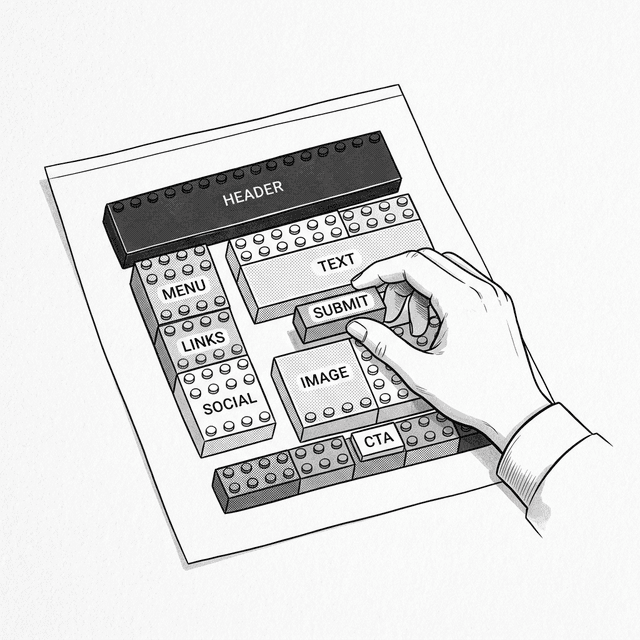
Then I could split the different UI parts into independent functions or classes, and assemble them like building blocks.
Yes. One of React's core design philosophies is to organize the UI by functional concerns rather than technical types. The structure, style, and behavior of a button—even though they are HTML, CSS, and JavaScript respectively—deal with the same thing. Putting them together makes more sense than scattering them across three files.
6.2 What Do Components Look Like
Suppose we have already split the page into multiple independent components. The expected way to compose them should look like this:
function renderApp() {
  return h('div', { id: 'app' }, [
    h(Header, { title: 'My Task List' }),
    h(TodoList, null, [
      h(TodoItem, { text: 'Learn JavaScript', done: true }),
      h(TodoItem, { text: 'Build Mini-React', done: false })
    ]),
    h(Footer, null)
  ]);
}Wait! For the first parameter tag of the h() function, we used to pass strings representing HTML tags (like 'div'). But here, Header and TodoItem are classes or functions themselves?
Yes. You can nest and assemble custom components just like using native HTML elements. It is equivalent to creating new "HTML tags" at any time.
But the lower level of our engine doesn't recognize these "custom tags" yet. If it encounters a node where the tag is not a string, mount and patch will definitely throw an error.
This is the problem we need to solve next.
💡 JSX Tip: In a real React project, you would write
<TodoItem text="Buy Milk" />using JSX. It will be converted by a compiler intoReact.createElement(TodoItem, { text: 'Buy Milk' })—which is the same as ourh(TodoItem, { text: 'Buy Milk' }).
6.3 Upgrading the Engine
To make the engine recognize components, we first need to define what a "component" is. Fundamentally, a component is a class with its own rendering logic.
class Component {
  constructor(props) {
    this.props = props || {};
  }

  render() {
    throw new Error('Component must implement render()');
  }
}With this base class, we can write UI components by inheriting from it. Since the essence of a class is a function, when we pass a component class into h(), the type of vnode.tag will become 'function'. The engine can use this to distinguish between regular HTML nodes and component nodes.
Upgrading mount
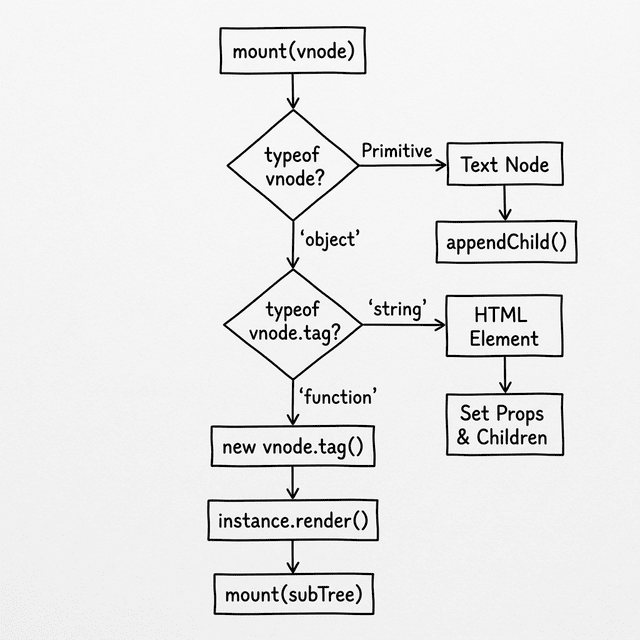
Inside mount, if you encounter a vnode.tag that is 'function', how should you render it?
I need to instantiate it using new, and pass vnode.props to the constructor at the same time. With the instance, I can call its render() method to get a VNode subtree. Then I can recursively call mount to attach this subtree to the page.
Clear thinking. But when mounting, we need to prepare for future updates (patch). If patch needs to update this component later, what information do you think it will need?
Hmm... First, it needs the instance of this component, so it can update the props and call render() again. Second, it also needs the old VNode subtree to compare with the new subtree.
Correct. We can save the instance on vnode._instance, and save the old subtree on instance._vnode. Finally, don't forget the bridge needed when patch operates on the real DOM—vnode.el.
But normal nodes have their own DOM elements. The component itself is just logic, it doesn't have a corresponding real DOM tag?
Think about it, what determines the physical position a component occupies on the page?
It is determined by the subtree rendered inside it! So its vnode.el should borrow the DOM of the root node of its subtree.
Precisely. Write down this logic.
  function mount(vnode, container) {
    if (typeof vnode === 'string' || typeof vnode === 'number') {
      container.appendChild(document.createTextNode(vnode));
      return;
    }

    // Handle component nodes
    if (typeof vnode.tag === 'function') {
      const instance = new vnode.tag(vnode.props); // Instantiate the component
      vnode._instance = instance;                  // Save the instance
      const subTree = instance.render();           // Get the internal VNode subtree
      instance._vnode = subTree;                   // Save the old subtree
      mount(subTree, container);                   // Recursively mount the subtree
      vnode.el = subTree.el;                       // Borrow the subtree's DOM as its own position marker
      return;
    }

    // Mounting logic for normal HTML tag nodes (same as the previous chapter)
    // ...
  }
Upgrading patch
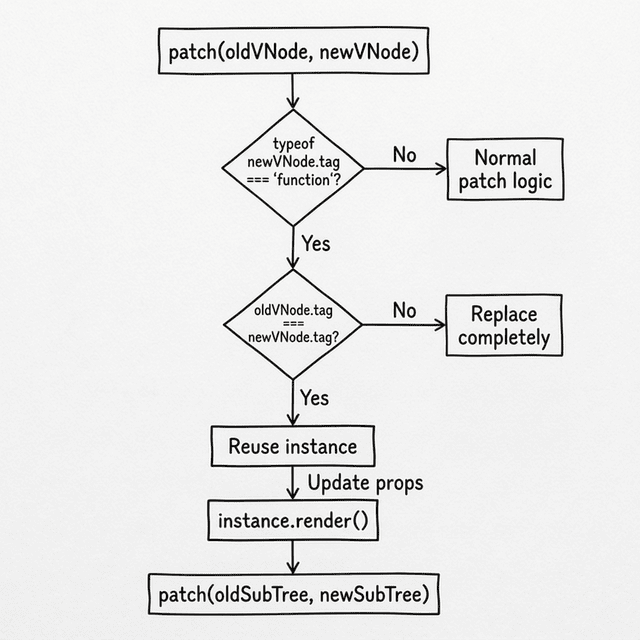
Now let's handle the update situation. When patch encounters two component nodes, if the tag of the old and new nodes is not the same component class (for example, TodoItem becomes Header), we directly determine them as completely different nodes and use the original logic to replace them. If they are the same component class before and after, how would you update them?
I can reuse the structure just established in mount:
- Get the old instance from
oldVNode:const instance = oldVNode._instance, and pass it tonewVNodefor reuse. - Refresh the properties on the instance:
instance.props = newVNode.props. - Call
render()again with the updated instance to get the new VNode subtree. - Get the old subtree from
instance._vnode, and pass the old and new subtrees topatchfor recursive handling.
Yes. The component update mechanism cleverly delegates the update to the underlying patch logic.
  function patch(oldVNode, newVNode) {
    // Handle component nodes
    if (typeof newVNode.tag === 'function') {
      if (oldVNode.tag === newVNode.tag) {
        // Same type of component: reuse instance, update props, re-render
        const instance = (newVNode._instance = oldVNode._instance);
        instance.props = newVNode.props;
        const oldSubTree = instance._vnode;
        const newSubTree = instance.render();
        instance._vnode = newSubTree;
        patch(oldSubTree, newSubTree);  // Recursively hand over to the underlying layer
        newVNode.el = newSubTree.el;
      } else {
        // Different types of components: direct replacement
        const parent = oldVNode.el.parentNode;
        mount(newVNode, parent);
        parent.replaceChild(newVNode.el, oldVNode.el);
      }
      return;
    }

    // ---- Logic for handling normal HTML nodes (same as the previous chapter) ----
    // ...
  }
6.4 Props: The Bridge Between Components
Now, suppose you want to make a Greeting component to display a greeting message:
class Greeting extends Component {
  render() {
    return h('h2', null, ['Hello, Alice!']);
  }
}If the page needs to greet both Alice and Bob at the same time, how do you plan to reuse this component?
I need to pass the name in from the outside when creating the component, just like passing parameters when calling a function.
Yes. This "component parameter" is called Props (Properties).
class Greeting extends Component {
  render() {
    return h('h2', null, ['Hello, ' + this.props.name + '!']);
  }
}

h(Greeting, { name: 'Alice' })  // → Hello, Alice!
h(Greeting, { name: 'Bob' }) // → Hello, Bob!I notice that h(Greeting, { name: 'Alice' }) looks exactly the same as when we wrote HTML nodes like h('div', { id: 'app' }). For HTML tags, the second parameter is DOM attributes; for components, the second parameter is Props.
Correct. Props have two iron rules:
- Read-only: A child component cannot modify Props, just as a function should not modify its input parameters.
- Data flows down: Data flows from parent components to child components, not the other way around.
If there is a delete button in the child component, how does the child component notify the parent component after the user clicks it?
Think about it, besides strings and numbers, what else can be passed as object properties in JavaScript?
Functions! Can the parent component pass a callback function to the child component via Props, and the child component calls it when clicked?
Yes. This is a Callback function.
// Parent component
class TodoApp extends Component {
  render() {
    return h('div', null, [
      h(TodoItem, {
        text: 'Buy Milk',
        onDelete: () => { console.log('Item deleted!'); }  // 👈 Pass the callback down
      })
    ]);
  }
}

// Child component
class TodoItem extends Component {
  render() {
    return h('li', null, [
      this.props.text,
      h('button', {
        onclick: this.props.onDelete  // 👈 Call the callback when triggered
      }, ['Delete'])
    ]);
  }
}Data flows down through Props, and events bubble up through callback functions. This ensures that the direction of data flow is always traceable.
6.5 Composition Over Inheritance
Note that we did not use inheritance to reuse components. TodoApp does not inherit from TodoItem; they are assembled together through Composition. This is another core concept of React: Composition Over Inheritance.
Can a component accept other components as internal content? Just like a div can contain other elements.
Since all properties are passed through Props, what property could you use to pass child elements in?
I could agree on a special property, like children, and pass it to the component to render internally:
class Card extends Component {
  render() {
    // When rendering, use the passed children as its own child nodes
    return h('div', { className: 'card' }, this.props.children);
  }
}

h(Card, { children: [
  h('h2', null, ['Title']),
  h('p', null, ['Any content can be put in here!'])
]})Yes. A wrapper component like Card is only responsible for providing a container and does not need to know what is inside. In real React, JSX will automatically fill the nested content into props.children.
6.6 The Puzzle is Half Complete
I can see the whole picture now. The engine doesn't recognize the concept of "components" at all; it only recognizes VNodes. It is mount and patch that automatically "translate" the component into a VNode subtree that the engine can process when they encounter a tag of function type.
Yes. Components are abstractions written for humans to read, while VNode is the language the engine actually runs. The mechanism you built today already supports the operational logic of the React component tree. But have you noticed that our component currently has a limitation—it can only rely on Props passed from the outside. Every time it renders, it is a blank slate.
Components don't have their own state?
Yes. If a button needs to remember how many times it has been clicked, the current component cannot do it. In the next lesson, we will give components memory, which will lead to React's State and Lifecycle.
📦 Try It Yourself
Open demoSave the following code as ch06.html. It demonstrates component mounting, passing Props, and parent-child component communication:
<!DOCTYPE html>
<html lang="en">
<head>
  <meta charset="UTF-8">
  <title>Chapter 6 — Components & Composition</title>
  <style>
    body { font-family: sans-serif; padding: 20px; max-width: 600px; margin: 0 auto; background: #f9f9f9; }
    .card { border: 1px solid #ddd; border-radius: 8px; padding: 15px; margin: 15px 0; background: white; }
    .card h3 { margin-top: 0; }
    button { padding: 6px 12px; cursor: pointer; margin: 4px; border-radius: 4px; border: 1px solid #ccc; background: #eee; }
    li { padding: 8px 0; border-bottom: 1px solid #eee; display: flex; justify-content: space-between; align-items: center; list-style: none; }
    li .task-content { display: flex; align-items: center; gap: 8px; }
    li.done span { text-decoration: line-through; color: #999; }
    li .delete-btn { background: #ff4444; color: white; border: none; padding: 4px 8px; border-radius: 4px; cursor: pointer; }
    input[type="text"] { padding: 8px; width: 60%; border-radius: 4px; border: 1px solid #ccc; }
    #stats { font-size: 14px; color: #666; margin-top: 10px; }
  </style>
</head>
<body>
  <div id="app"></div>

  <script>
    // === Mini-React Engine (Accumulated from Ch5 + Upgrades from this chapter) ===

    function h(tag, props, children) {
      return { tag, props: props || {}, children: children || [] };
    }

    class Component {
      constructor(props) { this.props = props || {}; }
      render() { throw new Error('Component must implement render()'); }
    }

    function mount(vnode, container) {
      if (typeof vnode === 'string' || typeof vnode === 'number') {
        container.appendChild(document.createTextNode(vnode));
        return;
      }
      // 🆕 Component node
      if (typeof vnode.tag === 'function') {
        const instance = new vnode.tag(vnode.props);
        vnode._instance = instance;
        const subTree = instance.render();
        instance._vnode = subTree;
        mount(subTree, container);
        vnode.el = subTree.el;
        return;
      }
      const el = (vnode.el = document.createElement(vnode.tag));
      for (const key in vnode.props) {
        if (key.startsWith('on')) {
          el.addEventListener(key.slice(2).toLowerCase(), vnode.props[key]);
        } else {
          if (key === 'className') el.setAttribute('class', vnode.props[key]);
          else if (key === 'style' && typeof vnode.props[key] === 'string') el.style.cssText = vnode.props[key];
          else el.setAttribute(key, vnode.props[key]);
        }
      }
      if (typeof vnode.children === 'string') {
        el.textContent = vnode.children;
      } else {
        (vnode.children || []).forEach(child => {
          if (typeof child === 'string' || typeof child === 'number') {
            el.appendChild(document.createTextNode(child));
          } else {
            mount(child, el);
          }
        });
      }
      container.appendChild(el);
    }

    function patch(oldVNode, newVNode) {
      // 🆕 Component node
      if (typeof newVNode.tag === 'function') {
        if (oldVNode.tag === newVNode.tag) {
          const instance = (newVNode._instance = oldVNode._instance);
          instance.props = newVNode.props;
          const oldSub = instance._vnode;
          const newSub = instance.render();
          instance._vnode = newSub;
          patch(oldSub, newSub);
          newVNode.el = newSub.el;
        } else {
          const parent = oldVNode.el.parentNode;
          mount(newVNode, parent);
          parent.replaceChild(newVNode.el, oldVNode.el);
        }
        return;
      }

      if (oldVNode.tag !== newVNode.tag) {
        const parent = oldVNode.el.parentNode;
        const tmp = document.createElement('div');
        mount(newVNode, tmp);
        parent.replaceChild(newVNode.el, oldVNode.el);
        return;
      }

      const el = (newVNode.el = oldVNode.el);
      const oldProps = oldVNode.props || {};
      const newProps = newVNode.props || {};
      for (const key in newProps) {
        if (oldProps[key] !== newProps[key]) {
          if (key.startsWith('on')) {
            const evt = key.slice(2).toLowerCase();
            if (oldProps[key]) el.removeEventListener(evt, oldProps[key]);
            el.addEventListener(evt, newProps[key]);
          } else {
            if (key === 'className') el.setAttribute('class', newProps[key]);
            else if (key === 'style' && typeof newProps[key] === 'string') el.style.cssText = newProps[key];
            else el.setAttribute(key, newProps[key]);
          }
        }
      }
      for (const key in oldProps) {
        if (!(key in newProps)) {
          if (key.startsWith('on')) el.removeEventListener(key.slice(2).toLowerCase(), oldProps[key]);
          else if (key === 'className') el.removeAttribute('class');
          else if (key === 'style') el.style.cssText = '';
          else el.removeAttribute(key);
        }
      }

      const oldChildren = oldVNode.children || [];
      const newChildren = newVNode.children || [];
      if (typeof newChildren === 'string') {
        if (oldChildren !== newChildren) el.textContent = newChildren;
      } else if (typeof oldChildren === 'string') {
        el.textContent = '';
        newChildren.forEach(c => mount(c, el));
      } else {
        const commonLength = Math.min(oldChildren.length, newChildren.length);
        for (let i = 0; i < commonLength; i++) {
          const oldChild = oldChildren[i], newChild = newChildren[i];
          if (typeof oldChild === 'string' && typeof newChild === 'string') {
            if (oldChild !== newChild) el.childNodes[i].textContent = newChild;
          } else if (typeof oldChild === 'object' && typeof newChild === 'object') {
            patch(oldChild, newChild);
          } else {
            if (typeof newChild === 'string' || typeof newChild === 'number') {
              el.replaceChild(document.createTextNode(newChild), el.childNodes[i]);
            } else {
              const tmp = document.createElement('div');
              mount(newChild, tmp);
              el.replaceChild(newChild.el, el.childNodes[i]);
            }
          }
        }
        if (newChildren.length > oldChildren.length) newChildren.slice(oldChildren.length).forEach(c => mount(c, el));
        if (newChildren.length < oldChildren.length) {
          for (let i = oldChildren.length - 1; i >= commonLength; i--) el.removeChild(el.childNodes[i]);
        }
      }
    }

    // === Application Components ===

    // Child component: TodoItem
    class TodoItem extends Component {
      render() {
        return h('li', this.props.done ? { className: 'done' } : null, [
          h('div', { className: 'task-content' }, [
            h('input', Object.assign({ type: 'checkbox', onchange: this.props.onToggle }, this.props.done ? { checked: true } : {})),
            h('span', null, [this.props.text])
          ]),
          h('button', { className: 'delete-btn', onclick: this.props.onDelete }, ['×'])
        ]);
      }
    }

    // Parent component: App
    let state = {
      todos: [
        { text: 'Learn JavaScript', done: true },
        { text: 'Build Mini-React', done: false },
        { text: 'Understand Components', done: false }
      ]
    };

    function renderApp(state) {
      const doneCount = state.todos.filter(t => t.done).length;
      return h('div', { className: 'card' }, [
        h('h3', null, ['My Todo List (Components)']),
        h('p', { id: 'stats' }, [`Completed ${doneCount} / Total ${state.todos.length} items`]),
        h('ul', { style: 'padding-left: 0; margin-bottom: 0;' },
          state.todos.map((todo, i) =>
            h(TodoItem, {
              text: todo.text,
              done: todo.done,
              onToggle: () => { todo.done = !todo.done; update(); },
              onDelete: () => { state.todos = state.todos.filter((_, idx) => idx !== i); update(); }
            })
          )
        )
      ]);
    }

    let prevVNode = null;
    function update() {
      const newVNode = renderApp(state);
      if (!prevVNode) {
        mount(newVNode, document.getElementById('app'));
      } else {
        patch(prevVNode, newVNode);
      }
      prevVNode = newVNode;
    }

    update();
  </script>
</body>
</html>
Interactive Demo
Open demo
This page runs the original HTML demo for the chapter.
Open demo