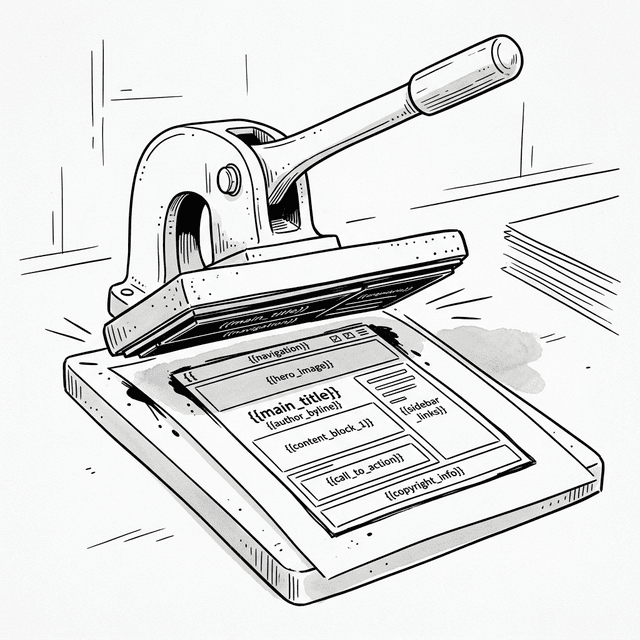
Chapter 2: The Template Era — UI as a String
2.1 Describe, Don't Instruct
Po came back to Shifu's room. He looked a little more relaxed than last time, but still confused.
Shifu, last time you said "think of the interface as a piece of text." I went home and tried it — directly concatenating HTML strings is much faster than creating nodes one by one. For example, the render logic from chapter one:
function renderApp() {
  let html = '<h1>My Todo List</h1>'
           + '<input type="text" id="todo-input" placeholder="Add a task">'
           + '<button onclick="addTodo()">Add</button>'
           + '<ul>';

  for (let i = 0; i < todos.length; i++) {
    html += '<li>' + todos[i] + '</li>';
  }

  html += '</ul>';
  app.innerHTML = html;
}
Now we only need to call innerHTML once!
Instead of acting like a foreman directing each brick, how does that feel?
Freeing. I only need to care about "what it should look like," not "how to build it." But...
But?
The code is ugly. Quotes and plus signs everywhere.
That's because you're still using raw language. Let's create a simple template syntax that lets data fill into a skeleton.
2.2 A Simple Template Engine
We need a function that takes a string template with "slots" and some data, then returns the HTML filled with that data.
Like this?
const template = '<li>{{content}}</li>';
const data = { content: 'Buy Milk' };
// Expected result: <li>Buy Milk</li>Exactly. Try to implement it.
Po thought for a moment, then wrote a simple regex-based implementation.
function render(template, data) {
  return template.replace(/\{\{(\w+)\}\}/g, function(match, key) {
    return data[key] || '';
  });
}

// Usage
const task = { content: 'Learn React' };
const html = render('<li>{{content}}</li>', task);
console.log(html); // <li>Learn React</li>Good. This is the core principle of a template engine — fill the "slots" in the template with data. ES6 Template Literals are the same concept, just natively supported by the language, more convenient:
// Our render function:
render('<li>{{content}}</li>', { content: task })

// ES6 template literal (same idea, cleaner syntax):
`<li>${task}</li>`I see! Template literals are a built-in template engine.
Exactly. Now use this thinking to refactor your Todo List. No more document.createElement, no more appendChild.
2.3 Rewriting the Todo List with Templates
Got it!
const app = document.getElementById('app');
const state = {
  todos: [
    { text: 'Learn JavaScript', done: true },
    { text: 'Learn Templates', done: false }
  ],
  inputValue: ''
};

function renderApp() {
  const html = `
    <div class="card">
      <h3>My Todo List</h3>
      <div>
        <input type="text" id="todo-input" value="${state.inputValue}">
        <button id="add-btn">Add</button>
      </div>
      <p id="stats">Total ${state.todos.length} items</p>
      <ul style="padding-left: 0;">
        ${state.todos.map((todo, index) => `
          <li class="${todo.done ? 'done' : ''}">
            <div class="task-content">
              <input type="checkbox" class="toggle-btn" data-index="${index}" ${todo.done ? 'checked' : ''}>
              <span>${todo.text}</span>
            </div>
            <button class="delete-btn" data-index="${index}">×</button>
          </li>
        `).join('')}
      </ul>
    </div>
  `;

  // 1. Destroy and rebuild
  app.innerHTML = html;

  // 2. Find nodes again and rebind events (showing the pain of the template era!)
  document.getElementById('todo-input').addEventListener('input', (e) => {
    state.inputValue = e.target.value;
    // Every keystroke causes a full re-render
    renderApp();
  });

  document.getElementById('add-btn').addEventListener('click', () => {
    if (!state.inputValue) return;
    state.todos.push({ text: state.inputValue, done: false });
    state.inputValue = '';
    renderApp();
  });

  document.querySelectorAll('.delete-btn').forEach(btn => {
    btn.addEventListener('click', (e) => {
      const index = e.target.dataset.index;
      state.todos.splice(index, 1);
      renderApp();
    });
  });

  document.querySelectorAll('.toggle-btn').forEach(checkbox => {
    checkbox.addEventListener('change', (e) => {
      const index = e.target.dataset.index;
      state.todos[index].done = !state.todos[index].done;
      renderApp();
    });
  });
}

// Initialize
renderApp();Wow, the structure is clear at a glance. I just modify state and call renderApp(), and the UI updates automatically. The stats don't need manual sync anymore — they're in the template, so they update automatically with the data!
You noticed the elegance. In chapter one, you had to call updateStats() manually to sync the stats. Now, the stats are just a derivative of state — when state changes, re-render the whole template, and everything syncs automatically.
The essence of what you wrote is the beginning of Declarative Programming — you declare "what the view looks like for a given state," rather than worrying about how to update the view when state changes.
2.4 The Destroy-and-Rebuild Problem
But Po, try using your new creation. Try typing a few characters in the input box.
Po opened the page in a browser, clicked the input, and typed the letter "A". Suddenly, the input box lost focus. He had to click the input again to type the next letter "B". Same thing happened again. Focus lost.
What's going on? Every time I type a letter I have to click the input again? This is unusable!
Think through the whole chain. When you press "A", what happens?
Press "A"
  → triggers input event
    → updateInput() calls renderApp()
      → renderApp() generates new HTML string
        → app.innerHTML = html  ← the old DOM tree is completely destroyed!
          → browser replaces old DOM with new DOM
→ new input has no focus → you have to click againI see! Every time I press a key, the entire DOM tree is destroyed and rebuilt!
Right. It's like tearing down and rebuilding the entire house just to change one light bulb.
- The DOM is newly created, so the previous input element is "dead."
- The new input box looks the same, but it's a brand new element.
- A brand new element naturally has no focus and no cursor position.
This is the cost of "Destroy and Rebuild" — simple and brutal, but a terrible user experience.
2.5 Security Risk (XSS)
Beyond the experience problem, there's an even scarier monster hiding in the string. What happens if I add a task like this?
state.todos.push('<img src=x onerror=alert("Hacked!")>');
renderApp();The template will concatenate it directly into the HTML... then the browser will treat it as a real <img> tag and execute it... Oh no, my script ran!
This is Cross-Site Scripting (XSS). Strings are dumb — they can't tell "user text" from "developer code." In the template era, you always have to be vigilant, carefully escaping every user input, or your app becomes a playground for hackers.
This isn't just popping an alert — in the real world, attackers can steal a user's cookies and session tokens through XSS, hijacking their session.
Wait — in chapter one, we used textContent to set list item text. That wouldn't have this problem, right?
Correct! textContent treats everything as plain text, so <img onerror=...> would be displayed as literal text, not executed. But innerHTML parses the string as HTML code. That's the price of convenience — string templates are easy to write but they open the door to attacks.
This is exactly why later frameworks (React, Vue) stopped using strings to describe UI. They use structured objects. User input is automatically escaped — unless you explicitly use dangerouslySetInnerHTML or v-html.
2.6 A Historical Note: Logic-less Templates (2009–2010)
Our simple render function is actually the prototype of a template engine. Around 2009, to solve the chaos of string concatenation, Mustache.js appeared.
Background: Mustache advocated "Logic-less templates." It believed templates should have no
if/forlogic — all logic should be handled in the data layer.
Later, Handlebars.js (2010) added more features (Helper functions) on top of this and became the most popular template engine of its era. People started getting used to separating data from HTML structure.
<!-- Handlebars style -->
<ul>
  {{#each todos}}
    <li>{{this}}</li>
  {{/each}}
</ul>{{each}} and {{this}}... These look a lot like the {{key}} syntax in our render function! We reinvented a template engine.
Yes. The idea of templates deeply influenced later frameworks. But no matter how advanced the template syntax, as long as it ultimately compiles to an HTML string assigned to innerHTML, it can't escape the "destroy and rebuild" fate.
2.7 One Step Further
Templates freed us from the imperative mess and gave us our first glimpse of declarative programming. But they aren't a perfect endpoint.
- Performance and experience:
innerHTMLfull updates cause "lost focus" and wasted performance. - Security: String concatenation is naturally prone to XSS.
We want the simplicity of declarative (data changes → regenerate the interface), but we don't want to "tear down everything" each time. What can we do?
If we knew exactly which part of the data changed, we could just update that part, right?
You've touched the core of the problem. To achieve this, we need a mechanism to listen for data changes and, when they happen, surgically update only the relevant DOM.
Like putting an "alarm" on the data?
Yes. That was an era full of clever design — and also an era when complexity started to explode.
📦 Try It Yourself
Open demoSave the following code as ch02.html to experience the declarative style of string templates, as well as the focus loss from full re-renders and the potential XSS risk:
<!DOCTYPE html>
<html lang="en">
<head>
<meta charset="UTF-8">
<title>Chapter 2 — Template Engine</title>
<style>
body { font-family: sans-serif; padding: 20px; max-width: 600px; margin: 0 auto; background: #f9f9f9; }
.card { border: 1px solid #ddd; border-radius: 8px; padding: 15px; margin: 15px 0; background: white; }
.card h3 { margin-top: 0; }
button { padding: 6px 12px; cursor: pointer; margin: 4px; border-radius: 4px; border: 1px solid #ccc; background: #eee; }
li { padding: 8px 0; border-bottom: 1px solid #eee; display: flex; justify-content: space-between; align-items: center; list-style: none; }
li .task-content { display: flex; align-items: center; gap: 8px; }
li.done span { text-decoration: line-through; color: #999; }
li .delete-btn { background: #ff4444; color: white; border: none; padding: 4px 8px; border-radius: 4px; cursor: pointer; }
input[type="text"] { padding: 8px; width: 60%; border-radius: 4px; border: 1px solid #ccc; }
#stats { font-size: 14px; color: #666; margin-top: 10px; }
</style>
</head>
<body>
<div id="app"></div>
<script>
const app = document.getElementById('app');
// 1. State
const state = {
todos: [
{ text: 'Learn JavaScript', done: true },
{ text: 'Learn Templates', done: false }
],
inputValue: ''
};
// 2. Simple template function
function renderApp() {
// No diff — generate full HTML string directly
const html = `
<div class="card">
<h3>My Todo List</h3>
<div>
<input type="text" id="todo-input" value="${state.inputValue}" placeholder="Add a task">
<button id="add-btn">Add</button>
</div>
<p id="stats">Total ${state.todos.length} items</p>
<ul id="todo-list" style="padding-left: 0; margin-bottom: 0;">
${state.todos.map((todo, index) => `
<li class="${todo.done ? 'done' : ''}">
<div class="task-content">
<input type="checkbox" class="toggle-btn" data-index="${index}" ${todo.done ? 'checked' : ''}>
<span>${todo.text}</span>
</div>
<button class="delete-btn" data-index="${index}">×</button>
</li>
`).join('')}
</ul>
<p style="color:red; font-size:12px;">Tip: try typing in the input box and notice the focus loss</p>
</div>
<div class="card">
<p style="font-size:12px; margin-top: 0;">🔓 <strong>XSS Experiment</strong>: Type in the input below:<br>
<code><img src=x onerror=alert("Hacked!")></code><br>then click "Inject" and see what happens.</p>
<input type="text" id="xss-input" placeholder="Enter malicious HTML...">
<button id="inject-btn">Inject</button>
</div>
`;
// 3. Destroy and rebuild: performance killer & experience killer
app.innerHTML = html;
// 4. After rebuilding the DOM, must rebind all events (pain point)
const inputEl = document.getElementById('todo-input');
if (inputEl) {
inputEl.addEventListener('input', (e) => {
state.inputValue = e.target.value;
renderApp(); // re-render on every keystroke!
});
}
const addBtn = document.getElementById('add-btn');
if (addBtn) {
addBtn.addEventListener('click', () => {
if (!state.inputValue) return;
state.todos.push({ text: state.inputValue, done: false });
state.inputValue = '';
renderApp();
});
}
document.querySelectorAll('.delete-btn').forEach(btn => {
btn.addEventListener('click', (e) => {
const index = e.target.dataset.index;
state.todos.splice(index, 1);
renderApp();
});
});
document.querySelectorAll('.toggle-btn').forEach(checkbox => {
checkbox.addEventListener('change', (e) => {
const index = e.target.dataset.index;
state.todos[index].done = !state.todos[index].done;
renderApp();
});
});
// XSS experiment event binding
const injectBtn = document.getElementById('inject-btn');
if (injectBtn) {
injectBtn.addEventListener('click', () => {
const xssInput = document.getElementById('xss-input');
if (!xssInput || !xssInput.value) return;
state.todos.push({ text: xssInput.value, done: false });
renderApp();
});
}
}
// Initial render
renderApp();
</script>
</body>
</html>Interactive Demo
Open demo
This page runs the original HTML demo for the chapter.
Open demo